Wacom Intuos Medium Bluetooth Drawing Tablet
$129.95 · verified Oct 23, 2026, 2:05 PM UTC



Wacom
Wacom Intuos Medium Bluetooth Drawing Tablet
#1 Best Seller in Graphics Tabletsverified Oct 23, 2026, 2:05 PM UTC
$129.95Price verified Oct 23, 2026, 2:05 PM UTC
Sold by Amazon.com
The standard entry-level recommendation for teens interested in digital art. Reliable, works out of the box, and comes with basic drawing software, a solid first tablet before stepping up to a screen-based model.
See current price on Amazon (opens Amazon in a new tab)Highlights
- Bluetooth connection, no cable tethering the tablet to the computer
- Ships with basic drawing software, so a teen can start right away
- Pen-and-tablet setup instead of a screen, which is the standard way most digital artists learn first
About Wacom Intuos Medium Bluetooth Drawing Tablet
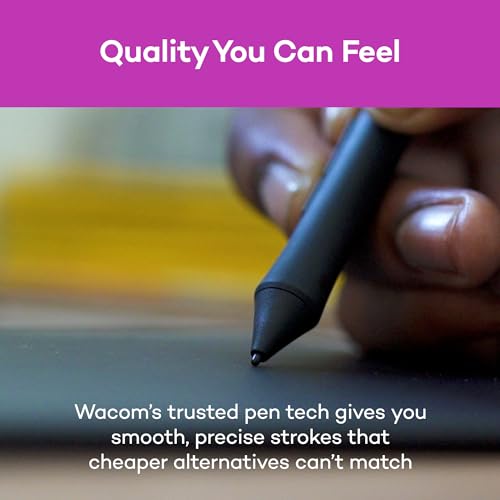
Amazon doesn't list a strict age gate on this general-electronics product, the 13+ here is an editorial call for this catalog rather than a manufacturer spec, this is genuinely usable well beyond the teen years too. The pressure-sensitive, battery-free pen with 4,096 levels gets consistent praise for feeling closer to pen-on-paper than expected, and it works across Windows, Mac, Chromebook, and select Android, reviewers have even confirmed it working on Linux beyond Wacom's official spec sheet.
The real learning curve here is looking at a separate screen while your hand draws on the tablet surface, a genuine adjustment, not a defect. Most reviewers say it clicks within days, comparable to learning to use a mouse without watching your hand, but one detailed critical review specifically argues the lack of an on-tablet display makes precise work frustrating, worth knowing if precision matters more than general sketching. Bluetooth connection stability is a real, recurring complaint too, a subset of buyers had to reinstall the driver or fall back to the included USB cable.
Registering the tablet unlocks a software bundle, but only Clip Studio Paint Pro is a lasting license, 2 years, the other two included titles, Corel Painter Essentials 7 and Corel AfterShot Pro 3, are 90-day trials only, worth knowing so it isn't oversold as three permanent programs.
Specs
| Length | 10.4 in |
|---|---|
| Width | 7.8 in |
| Height | 0.4 in |
| Weight | 0.91 lbs |
Manufacturer-provided dimensions. May reflect packaging rather than the assembled product.
The Honest Take
What We Like and What We Don't
What we like
- Pressure-sensitive, battery-free pen genuinely praised as feeling closer to pen-on-paper than expected
- Broad compatibility across Windows, Mac, Chromebook, select Android, and even confirmed working on Linux
- Genuinely portable and desk-friendly, Bluetooth removes cable clutter for travel or remote classes
- Includes a real, permanent Clip Studio Paint Pro license just for registering the tablet
What holds it back
- Bluetooth connection stability is a recurring complaint, some buyers needed a driver reinstall or the USB fallback
- The screen-less drawing setup is a genuine adjustment, one detailed critical review found precision work frustrating without an on-tablet display
- Two of the three bundled software titles are 90-day trials, not permanent licenses
Is This For You?
Who Should (and Shouldn't) Buy This
Get it if…
Get it if the recipient has already expressed interest in digital drawing, animation, or illustration and is comfortable with a short learning curve while their hand and eyes recalibrate to a separate screen.
Skip it if…
Skip it if you're buying this as a generic creative gift for someone with no specific interest in digital art, the eye-hand disconnect and occasional Bluetooth troubleshooting will likely turn a casual user off before they get to the fun part.
The verdict
This tablet backs up its strong rating with genuinely consistent praise for pen feel, pressure sensitivity, and cross-platform compatibility. The honest catch falls into two buckets: a Bluetooth connection that occasionally needs a driver reinstall, and a real skill gap for anyone expecting to draw while watching the tablet itself rather than a separate monitor, that's just how screen-less tablets work, but it trips up buyers who don't know that going in.
What Real Buyers Say
“The connectivity via Bluetooth ensures a clutter-free workspace, and the setup process was a breeze. The learning curve was surprisingly minimal, the intuitive interface makes navigation and customization easy for both beginners and professionals.”
United States
“I was worried that I wouldn't like writing on the tablet without seeing what I was writing, but I actually found it very easy to get used to, it's like how we move a computer mouse on a desk while looking up at the screen. I did have an issue with Bluetooth connecting at one point, but I just reinstalled the driver and everything works fine now.”
United States
“Your mouse pointer is going to track a magnitude of times more precisely than hovering the tip of the pen over the surface of this particular tablet. There is a noticeable lag, and it jumps around sometimes. If you need any type of precision you have to move extraordinarily slowly or find something else.”
United States
“It serves its function well. I like the feel of the stylus on the tablet when I draw, but I cannot make it connect to Bluetooth. It doesn't affect its function, I can use it plugged in, but it is not what I paid for.”
United States
Frequently Asked Questions
Is this good for a complete beginner, or do you need to already know how to draw?
You don't need prior digital art experience, but expect a short adjustment period. Most reviewers say the tablet felt natural within days, but a few, including one detailed critical review, found the lack of an on-tablet screen made precise work genuinely frustrating at first. If the giftee already draws or sketches by hand, they'll likely adjust faster.
Does the Bluetooth connection actually work reliably, or is it a hassle?
For most buyers it works fine, but Bluetooth dropouts are a real, repeated complaint, a couple of users had the tablet stop connecting after a while and had to reinstall the driver to fix it. The tablet ships with a USB cable, so a wired connection is always available as a fallback.
What software actually comes with it, and is it free forever?
Registering the tablet unlocks Clip Studio Paint Pro, Corel Painter Essentials 7, and Corel AfterShot Pro 3. Only Clip Studio Paint Pro is a lasting license, 2 years, the other two are 90-day trials that need to be purchased separately after that window.
Convinced?
Check the current price and availability on Amazon.
See it on Amazon (opens Amazon in a new tab)Read the Full Guide
See how this one compares to the best alternatives
Similar Products
More picks in Arts & Crafts